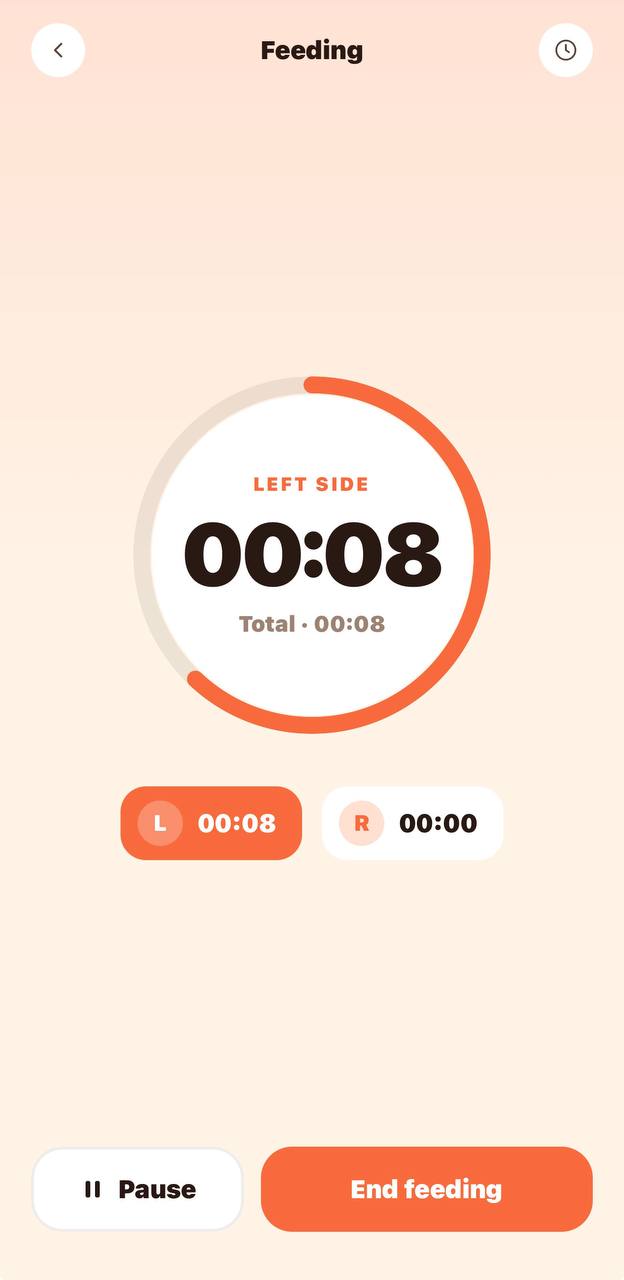
Breastfeeding tracker with left and right timers
Start a nursing session and select the side you are using. Switch between left and right during the feed, or pause the timer for a break. BabyGrow keeps a separate duration for each side. When you finish, save the session to the feeding history so you can look back at what you recorded.
Bottle feeding log with amounts in ml
Choose bottle feeding and enter the amount you want to record in milliliters. Bottle entries sit alongside nursing sessions, so a family using both breast and bottle feeding can review one history. You do not need a separate diary for each type of feed.
Solid-food notes alongside milk feeds
Choose a solid-food entry and add a note about the food. Keeping these entries in the same diary gives the next caregiver a place to check what was logged earlier. These are your own observations; the app does not turn them into a prescribed feeding schedule.
How it works
A shared feeding tracker for parents and caregivers
During a handover, the next caregiver can open the same feeding history instead of asking you to repeat the last entry. A breastfeeding timer started on one phone is visible to another family member with tracker access. Bottle amounts and food notes stay with your child's records, alongside the family's sleep and diaper logs.
Questions parents ask
Is the BabyGrow feeding tracker free?
The free plan includes feeding, sleep and diaper tracking for one child. Premium adds more child profiles and all PRO games. You can start with one baby's feeding log without a Premium subscription.
Can I track breastfeeding and bottle feeding together?
Yes. Breastfeeding sessions, bottle feeds and solid foods appear in the same feeding history. Breastfeeding entries keep separate left and right durations; bottle entries keep the amount you record.
Can two parents share the same feeding log?
Yes. Invite the second parent to your BabyGrow family and give them tracker access. Shared records and running timers are available across caregivers' devices.
Does the bottle tracker use ml or oz?
Bottle amounts are currently entered in milliliters (ml). The feeding screen does not currently offer an ounce selector.
Can I use this feeding tracker on iPhone?
Yes. BabyGrow is available on iPhone through the App Store and on Android through Google Play. The screenshot on this page shows the mobile app; this website is not an online feeding diary.
Does BabyGrow tell me how much or how often to feed?
No. BabyGrow records the feeds you enter. It does not prescribe amounts, set a feeding schedule or assess whether your baby has had enough. Ask a qualified clinician about your baby's feeding needs.